Difference between revisions of "Download Default Data Samples"
m |
m |
||
| Line 25: | Line 25: | ||
| + | <!--Setting in Location --> | ||
<div class="plainlinks" style="border: 1px solid SkyBlue; -moz-box-shadow: 0 1px 3px rgba(0, 0, 0, 0.35); -webkit-box-shadow: 0 1px 3px rgba(0, 0, 0, 0.35); box-shadow: 0 1px 3px rgba(0, 0, 0, 0.35); -moz-border-radius: 7px; -webkit-border-radius: 7px; border-radius: 7px 7px 0px 0px; background: #fff; background: -moz-linear-gradient(top, #fff 75%, #F5F5F5 100%); background-color: LightBlue; background-image: -moz-linear-gradient(top, LightBlue, #5f96d3); background-image: -ms-linear-gradient(top, LightBlue, #5f96d3); background-image: -o-linear-gradient(top, LightBlue, #5f96d3); background-image: -webkit-gradient(linear, left top, left bottom, from(LightBlue), to(#5f96d3)); height:auto; padding-left: 7px; padding-top:5px; padding-bottom:0px; margin-left:99px; margin-right:98px; position: relative"> | <div class="plainlinks" style="border: 1px solid SkyBlue; -moz-box-shadow: 0 1px 3px rgba(0, 0, 0, 0.35); -webkit-box-shadow: 0 1px 3px rgba(0, 0, 0, 0.35); box-shadow: 0 1px 3px rgba(0, 0, 0, 0.35); -moz-border-radius: 7px; -webkit-border-radius: 7px; border-radius: 7px 7px 0px 0px; background: #fff; background: -moz-linear-gradient(top, #fff 75%, #F5F5F5 100%); background-color: LightBlue; background-image: -moz-linear-gradient(top, LightBlue, #5f96d3); background-image: -ms-linear-gradient(top, LightBlue, #5f96d3); background-image: -o-linear-gradient(top, LightBlue, #5f96d3); background-image: -webkit-gradient(linear, left top, left bottom, from(LightBlue), to(#5f96d3)); height:auto; padding-left: 7px; padding-top:5px; padding-bottom:0px; margin-left:99px; margin-right:98px; position: relative"> | ||
<table width=98% border="0"> | <table width=98% border="0"> | ||
| Line 37: | Line 38: | ||
<td> | <td> | ||
<p align=center><br><br><br><strong> Sample Default Data In Location Category </strong></p> | <p align=center><br><br><br><strong> Sample Default Data In Location Category </strong></p> | ||
| − | <p align=center>[[File:Sample_Data_Location_1.png| | + | <p align=center>[[File:Sample_Data_Location_1.png|350px|link=|center|Sample Default Data In Location Category]]</p> |
</td> | </td> | ||
</tr> | </tr> | ||
| Line 48: | Line 49: | ||
<td> | <td> | ||
<p align=center><strong> Sample Default Data In Location Detail </strong></p> | <p align=center><strong> Sample Default Data In Location Detail </strong></p> | ||
| − | <p align=center>[[File:Sample_Data_Location_2.png| | + | <p align=center>[[File:Sample_Data_Location_2.png|350px|link=|center|Sample Default Data In Location Detail]]<br><br></p> |
</td> | </td> | ||
</tr> | </tr> | ||
</table> | </table> | ||
</div> | </div> | ||
| + | <!--End of Setting in Location --> | ||
| Line 58: | Line 60: | ||
| + | <!--Setting in User Management--> | ||
<div class="plainlinks" style="border: 1px solid SkyBlue; -moz-box-shadow: 0 1px 3px rgba(0, 0, 0, 0.35); -webkit-box-shadow: 0 1px 3px rgba(0, 0, 0, 0.35); box-shadow: 0 1px 3px rgba(0, 0, 0, 0.35); -moz-border-radius: 7px; -webkit-border-radius: 7px; border-radius: 7px 7px 0px 0px; background: #fff; background: -moz-linear-gradient(top, #fff 75%, #F5F5F5 100%); background-color: LightBlue; background-image: -moz-linear-gradient(top, LightBlue, #5f96d3); background-image: -ms-linear-gradient(top, LightBlue, #5f96d3); background-image: -o-linear-gradient(top, LightBlue, #5f96d3); background-image: -webkit-gradient(linear, left top, left bottom, from(LightBlue), to(#5f96d3)); height:auto; padding-left: 7px; padding-top:5px; padding-bottom:0px; margin-left:99px; margin-right:98px; position: relative"> | <div class="plainlinks" style="border: 1px solid SkyBlue; -moz-box-shadow: 0 1px 3px rgba(0, 0, 0, 0.35); -webkit-box-shadow: 0 1px 3px rgba(0, 0, 0, 0.35); box-shadow: 0 1px 3px rgba(0, 0, 0, 0.35); -moz-border-radius: 7px; -webkit-border-radius: 7px; border-radius: 7px 7px 0px 0px; background: #fff; background: -moz-linear-gradient(top, #fff 75%, #F5F5F5 100%); background-color: LightBlue; background-image: -moz-linear-gradient(top, LightBlue, #5f96d3); background-image: -ms-linear-gradient(top, LightBlue, #5f96d3); background-image: -o-linear-gradient(top, LightBlue, #5f96d3); background-image: -webkit-gradient(linear, left top, left bottom, from(LightBlue), to(#5f96d3)); height:auto; padding-left: 7px; padding-top:5px; padding-bottom:0px; margin-left:99px; margin-right:98px; position: relative"> | ||
<table width=98% border="0"> | <table width=98% border="0"> | ||
| Line 97: | Line 100: | ||
</table> | </table> | ||
</div> | </div> | ||
| + | <!--End of Setting in User Management--> | ||
Revision as of 11:23, 29 November 2019
Download |
|
|
Sample Default Data For Setting In Location Menu |
|
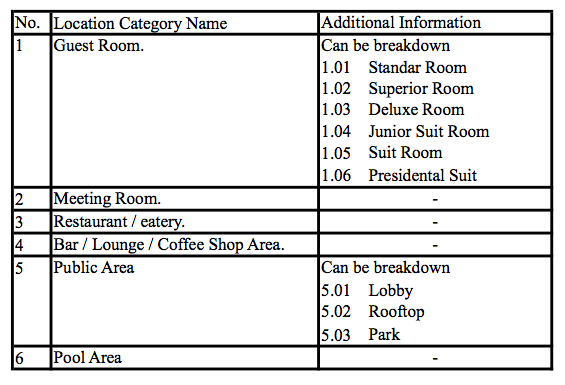 |
|
Sample Default Data In Location Detail 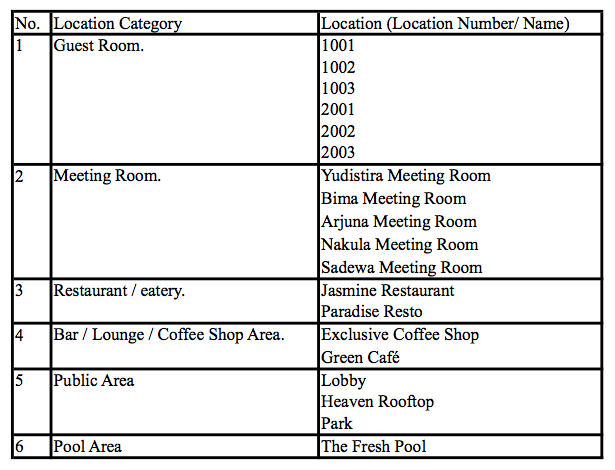 |
Sample Default Data For Setting In Location Menu |
|
 |
|
Sample Default Data in Staff Position 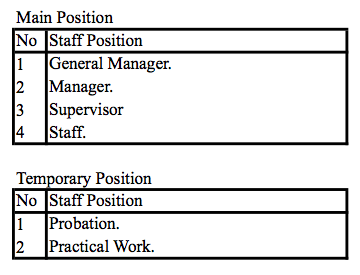 |
|
Sample Default Data in User Login  |
Sample Default Data For Setting In Item Request Menu |
|
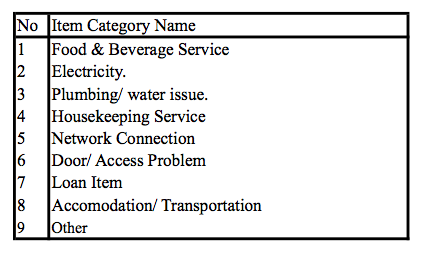 |
|
Sample Default Data In Location Detail 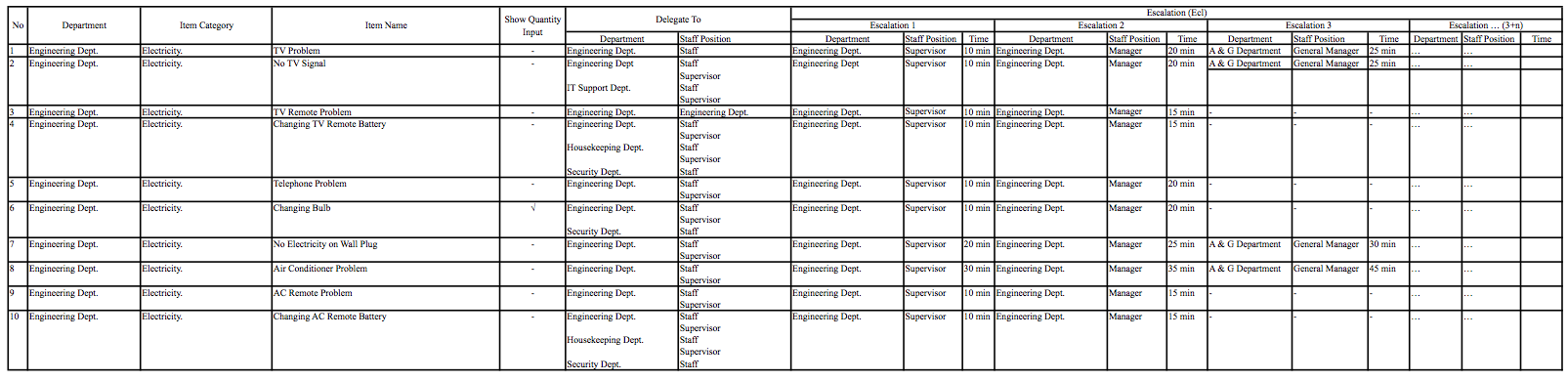 |
Sample Default Data For Setting In Set Alert |
|
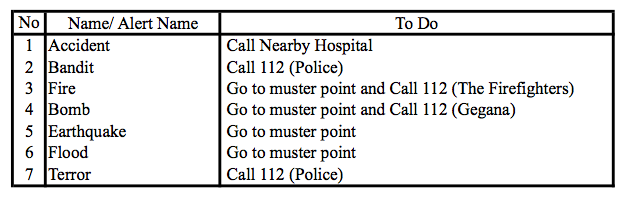 |
For more information, please visit our website.
 |
Copyright © 2019 KEPONET. All Rights reserved. |
