Difference between revisions of "Main Page"
m |
|||
| (46 intermediate revisions by the same user not shown) | |||
| Line 20: | Line 20: | ||
<tr> | <tr> | ||
<td width=3%></td> | <td width=3%></td> | ||
| − | <td valign=bottom width= | + | <td valign=bottom width=11%> <li> [[Main_Page|Main Page]] </li></td> |
| − | <td valign=bottom width= | + | <td valign=bottom width=9%> <li> [[Product|Product]] </li></td> |
| − | <td valign=bottom width= | + | <td valign=bottom width=10%> <li> [[Register|Registration]] </li></td> |
| − | <td valign=bottom width= | + | <td valign=bottom width=10%> <li> [[Pricing|Pricing]] </li></td> |
| − | <td valign=bottom width= | + | <td valign=bottom width=10%> <li> [[First_Use|First Use]] </li></td> |
| − | <td valign=bottom width= | + | <td valign=bottom width=10%> <li> [[Operation|Operation]] </li></td> |
| − | <td valign=bottom width= | + | <td valign=bottom width=10%> <li> [[Renew|Subscription]] </li></td> |
| + | <td valign=bottom width=10%> <li> [[Affiliates|Affiliates]] </li></td> | ||
| + | <td valign=bottom width=10%> <li> [[What_If|What If]] </li></td> | ||
| + | <td valign=bottom width=10%> <li> [[Contact|Contact]] </li></td> | ||
<td> | <td> | ||
<div style="font-size: 100%; font-weight:bold; margin-top:-108px; margin-right:-30px;> [[File:Logo_with_bg.png|right|130px|link=Main_Page]] | <div style="font-size: 100%; font-weight:bold; margin-top:-108px; margin-right:-30px;> [[File:Logo_with_bg.png|right|130px|link=Main_Page]] | ||
| Line 38: | Line 41: | ||
| − | <p align=center> KEPONET is a super smart friendly app that is able to record every guest request. It is even equipped with the data about when the request is fulfilled and by whom. This authentic data that captured real-time can be implemented as the basis for the hotel management to draw some profitable decision and even to evaluate all hotel staff performance.</p> | + | <p align=center> KEPONET is a super-smart friendly app that is able to record every guest request. It is even equipped with the data about when the request is fulfilled and by whom. This authentic data that captured real-time can be implemented as the basis for the hotel management to draw some profitable decision and even to evaluate all hotel staff performance.</p> |
| − | <p align=center><font color= | + | <p align=center><font color=#0f82ea><strong> INTRODUCING KEPONET </font></strong></p> |
| − | {{#ev:youtube|https://www.youtube.com/watch?v=DVu2Ip3dmYI | + | {{#ev:youtube|https://www.youtube.com/watch?v=DVu2Ip3dmYI|450|center}} |
| Line 52: | Line 55: | ||
<!--Colom1, baris1--> | <!--Colom1, baris1--> | ||
<!--What's new ?--> | <!--What's new ?--> | ||
| − | <td width=30% colspan= | + | <td width=30% colspan=4 valign=top> |
<div class="plainlinks" style="border: 1px solid SkyBlue; -moz-box-shadow: 0 1px 3px rgba(0, 0, 0, 0.35); -webkit-box-shadow: 0 1px 3px rgba(0, 0, 0, 0.35); box-shadow: 0 1px 3px rgba(0, 0, 0, 0.35); -moz-border-radius: 7px; -webkit-border-radius: 7px; border-radius: 7px; background: #fff; background: -moz-linear-gradient(top, #fff 75%, #F5F5F5 100%); background-color: LightBlue; background-image: -moz-linear-gradient(top, LightBlue, #5f96d3); background-image: -ms-linear-gradient(top, LightBlue, #5f96d3); background-image: -o-linear-gradient(top, LightBlue, #5f96d3); background-image: -webkit-gradient(linear, left top, left bottom, from(LightBlue), to(#5f96d3)); height:auto; padding-left: 10px; padding-top:3px; padding-bottom:3px; padding-right:20px; margin-left:10px; margin-right:10px;"> | <div class="plainlinks" style="border: 1px solid SkyBlue; -moz-box-shadow: 0 1px 3px rgba(0, 0, 0, 0.35); -webkit-box-shadow: 0 1px 3px rgba(0, 0, 0, 0.35); box-shadow: 0 1px 3px rgba(0, 0, 0, 0.35); -moz-border-radius: 7px; -webkit-border-radius: 7px; border-radius: 7px; background: #fff; background: -moz-linear-gradient(top, #fff 75%, #F5F5F5 100%); background-color: LightBlue; background-image: -moz-linear-gradient(top, LightBlue, #5f96d3); background-image: -ms-linear-gradient(top, LightBlue, #5f96d3); background-image: -o-linear-gradient(top, LightBlue, #5f96d3); background-image: -webkit-gradient(linear, left top, left bottom, from(LightBlue), to(#5f96d3)); height:auto; padding-left: 10px; padding-top:3px; padding-bottom:3px; padding-right:20px; margin-left:10px; margin-right:10px;"> | ||
<table width=100% border="0"> | <table width=100% border="0"> | ||
| Line 72: | Line 75: | ||
</td> | </td> | ||
<td valign=top width=79%> | <td valign=top width=79%> | ||
| − | <p style="text-align:justify;"><li> | + | <p style="text-align:justify;"><li> Copy the menu access and authority from existing users. </p> |
| − | <p style="text-align:justify;"><li> | + | <p style="text-align:justify;"><li> Improvements in the "Create Request" page. </p> |
| + | <p style="text-align:justify;"><li> Improvements in the referral section. </p> | ||
| + | <p style="text-align:justify;"><li> Give waiting time to reactivate the user. </p> | ||
| + | <p style="text-align:justify;"><li> Updates on restrictions of authorization access for each user. </p> | ||
| + | <!-- <p style="text-align:justify;"><li> The new Keponet design is currently in the works. </p> --> | ||
| + | <!-- <p style="text-align:justify;"><li> New features are being developed and tested. </p> --> | ||
| + | <!-- <p style="text-align:justify;"><li> Operator feature has been released. </p> --> | ||
| + | <!-- <p style="text-align:justify;"><li> Direct task assign feature has been released. </p> --> | ||
| + | <!-- <p style="text-align:justify;"><li> New features are being developed. </p> --> | ||
| + | <!-- <p style="text-align:justify;"><li> The attachment feature has been released. </p> --> | ||
| + | <!-- <p style="text-align:justify;"><li> New features and new versions are being developed. </p> --> | ||
| + | <p style="text-align:justify;"><li> [[Logs|...]] </p> | ||
<td valign=top width=20%> | <td valign=top width=20%> | ||
| − | <p style="text-align:justify;"> | + | <p style="text-align:justify;"> July 15, 2020 </p> |
| − | <p style="text-align:justify;"> | + | <p style="text-align:justify;"> July 01, 2020 </p> |
| + | <p style="text-align:justify;"> June 22, 2020 </p> | ||
| + | <p style="text-align:justify;"> June 16, 2020 </p> | ||
| + | <p style="text-align:justify;"> May 28, 2020 </p> | ||
| + | <!-- <p style="text-align:justify;"> May 10, 2020 </p> --> | ||
| + | <!-- <p style="text-align:justify;"> March 09, 2020 </p> --> | ||
| + | <!-- <p style="text-align:justify;"> November 15, 2019 </p> --> | ||
| + | <!-- <p style="text-align:justify;"> November 15, 2019 </p> --> | ||
| + | <!-- <p style="text-align:justify;"> November 01, 2019 </p> --> | ||
| + | <!-- <p style="text-align:justify;"> October 25, 2019 </p> --> | ||
| + | <!-- <p style="text-align:justify;"> October 01, 2019 </p> --> | ||
</tr> | </tr> | ||
<tr> | <tr> | ||
<td colspan=3><br><hr><br></td> | <td colspan=3><br><hr><br></td> | ||
| + | </tr> | ||
| + | <tr> | ||
| + | <td colspan=3> | ||
| + | <p style="text-align:justify;"> Sometimes when you install to a new version, our application is still detected by your device in the previous version. Therefore, to minimize errors like this, please <strong> clear the cache in Google play and clear the cache in the settings on your device too </strong> after that do install update version of the Keponet. | ||
| + | <br><strong> P.B. : </strong> Still have an issue? Try uninstalling your app first, then reinstalling it again. </br> | ||
| + | </p> | ||
| + | </td> | ||
</tr> | </tr> | ||
<tr> | <tr> | ||
| Line 91: | Line 122: | ||
</td> | </td> | ||
<td valign=top width=79%> | <td valign=top width=79%> | ||
| − | <p style="text-align:justify;"><li> Keponet Android version 1.1. | + | <p style="text-align:justify;"><li> Yippee! Keponet v 1.2.1 is available on Playstore now. </p> |
| − | <p style="text-align:justify;"><li> Keponet iOS version 1.1.1 | + | <!-- <p style="text-align:justify;"><li> Yippee! Keponet v 1.2.0 is available on Playstore now. </p> --> |
| + | <p style="text-align:justify;"><li> Finalizing the latest version of Keponet (Keponet v 1.2.0). </p> | ||
| + | <p style="text-align:justify;"><li> New designs (All-new) for Android are being developed and tested. </p> | ||
| + | <p style="text-align:justify;"><li> New designs (All-new) for iOS are being developed and tested. </p> | ||
| + | <p style="text-align:justify;"><li> Keponet Android version 1.1.6 available on PlayStore now. </p> | ||
| + | <!-- <p style="text-align:justify;"><li> Keponet Android version 1.1.5 available on PlayStore now. </p> --> | ||
| + | <!-- <p style="text-align:justify;"><li> New features and new versions for iOS and Android are being developed. </p> --> | ||
| + | <!-- <p style="text-align:justify;"><li> Keponet Android version 1.1.4 available on PlayStore now. </p> --> | ||
| + | <!-- <p style="text-align:justify;"><li> Keponet Android version 1.1.3 (Unreleased version). </p> --> | ||
| + | <p style="text-align:justify;"><li> [[Logs|...]] </p> | ||
<td valign=top width=20%> | <td valign=top width=20%> | ||
| − | <p style="text-align:justify;"> | + | <p style="text-align:justify;"> August 28, 2020 </p> |
| − | <p style="text-align:justify;"> | + | <p style="text-align:justify;"> August 25, 2020 </p> |
| + | <p style="text-align:justify;"> May 01, 2020 </p> | ||
| + | <p style="text-align:justify;"> May 01, 2020 </p> | ||
| + | <p style="text-align:justify;"> November 15, 2019 </p> | ||
| + | <!-- <p style="text-align:justify;"> November 13, 2019 </p> --> | ||
| + | <!-- <p style="text-align:justify;"> November 01, 2019 </p> --> | ||
| + | <!-- <p style="text-align:justify;"> October 21, 2019 </p> --> | ||
| + | <!-- <p style="text-align:justify;"> October 15, 2019 </p> --> | ||
</tr> | </tr> | ||
</td> | </td> | ||
| Line 107: | Line 154: | ||
<!--Colom1, baris2--> | <!--Colom1, baris2--> | ||
<!--Product--> | <!--Product--> | ||
| − | <td width= | + | <td width=25% valign=top> |
<div class="plainlinks" style="border: 1px solid SkyBlue; -moz-box-shadow: 0 1px 3px rgba(0, 0, 0, 0.35); -webkit-box-shadow: 0 1px 3px rgba(0, 0, 0, 0.35); box-shadow: 0 1px 3px rgba(0, 0, 0, 0.35); -moz-border-radius: 7px; -webkit-border-radius: 7px; border-radius: 7px; background: #fff; background: -moz-linear-gradient(top, #fff 75%, #F5F5F5 100%); background-color: LightBlue; background-image: -moz-linear-gradient(top, LightBlue, #5f96d3); background-image: -ms-linear-gradient(top, LightBlue, #5f96d3); background-image: -o-linear-gradient(top, LightBlue, #5f96d3); background-image: -webkit-gradient(linear, left top, left bottom, from(LightBlue), to(#5f96d3)); height:auto; padding-left: 15px; padding-top:3px; padding-bottom:3px; padding-right:20px; margin-left:10px; margin-right:10px;"> | <div class="plainlinks" style="border: 1px solid SkyBlue; -moz-box-shadow: 0 1px 3px rgba(0, 0, 0, 0.35); -webkit-box-shadow: 0 1px 3px rgba(0, 0, 0, 0.35); box-shadow: 0 1px 3px rgba(0, 0, 0, 0.35); -moz-border-radius: 7px; -webkit-border-radius: 7px; border-radius: 7px; background: #fff; background: -moz-linear-gradient(top, #fff 75%, #F5F5F5 100%); background-color: LightBlue; background-image: -moz-linear-gradient(top, LightBlue, #5f96d3); background-image: -ms-linear-gradient(top, LightBlue, #5f96d3); background-image: -o-linear-gradient(top, LightBlue, #5f96d3); background-image: -webkit-gradient(linear, left top, left bottom, from(LightBlue), to(#5f96d3)); height:auto; padding-left: 15px; padding-top:3px; padding-bottom:3px; padding-right:20px; margin-left:10px; margin-right:10px;"> | ||
<table width=99% border="0"> | <table width=99% border="0"> | ||
| Line 119: | Line 166: | ||
<tr> | <tr> | ||
<td valign=top width=10%> | <td valign=top width=10%> | ||
| − | <p style="text-align:justify;"> [[Image:Login.png|link:Product| | + | <p style="text-align:justify;"> [[Image:Login.png|link:Product|225px|link=Product|center|Keponet]] </p> |
| − | <p style="text-align:justify;"> <br> | + | <p style="text-align:justify;"> <br> Keponet is request management system in every location within the hotel area and is very useful to improving the standard of handling requests from hotel guests and make staff performance in prime condition to achieve customer satisfaction. ... </p> |
<p style="text-align:right;"><br> [[Product|More details >>>]] | <p style="text-align:right;"><br> [[Product|More details >>>]] | ||
</td> | </td> | ||
| Line 133: | Line 180: | ||
<!--Register--> | <!--Register--> | ||
<!--Colom2, baris2--> | <!--Colom2, baris2--> | ||
| − | <td width= | + | <td width=25% valign=top> |
<div class="plainlinks" style="border: 1px solid SkyBlue; -moz-box-shadow: 0 1px 3px rgba(0, 0, 0, 0.35); -webkit-box-shadow: 0 1px 3px rgba(0, 0, 0, 0.35); box-shadow: 0 1px 3px rgba(0, 0, 0, 0.35); -moz-border-radius: 7px; -webkit-border-radius: 7px; border-radius: 7px; background: #fff; background: -moz-linear-gradient(top, #fff 75%, #F5F5F5 100%); background-color: LightBlue; background-image: -moz-linear-gradient(top, LightBlue, #5f96d3); background-image: -ms-linear-gradient(top, LightBlue, #5f96d3); background-image: -o-linear-gradient(top, LightBlue, #5f96d3); background-image: -webkit-gradient(linear, left top, left bottom, from(LightBlue), to(#5f96d3)); height:auto; padding-left: 15px; padding-top:3px; padding-bottom:3px; padding-right:20px; margin-left:10px; margin-right:10px;"> | <div class="plainlinks" style="border: 1px solid SkyBlue; -moz-box-shadow: 0 1px 3px rgba(0, 0, 0, 0.35); -webkit-box-shadow: 0 1px 3px rgba(0, 0, 0, 0.35); box-shadow: 0 1px 3px rgba(0, 0, 0, 0.35); -moz-border-radius: 7px; -webkit-border-radius: 7px; border-radius: 7px; background: #fff; background: -moz-linear-gradient(top, #fff 75%, #F5F5F5 100%); background-color: LightBlue; background-image: -moz-linear-gradient(top, LightBlue, #5f96d3); background-image: -ms-linear-gradient(top, LightBlue, #5f96d3); background-image: -o-linear-gradient(top, LightBlue, #5f96d3); background-image: -webkit-gradient(linear, left top, left bottom, from(LightBlue), to(#5f96d3)); height:auto; padding-left: 15px; padding-top:3px; padding-bottom:3px; padding-right:20px; margin-left:10px; margin-right:10px;"> | ||
<table width=99% border="0"> | <table width=99% border="0"> | ||
| Line 146: | Line 193: | ||
<tr> | <tr> | ||
<td valign=top width=10%> | <td valign=top width=10%> | ||
| − | <p style="text-align:justify;"> [[Image:Register_icon.png| | + | <p style="text-align:justify;"> <br> [[Image:Register_icon.png|200px|link=Register|center|Registration]] </p> |
| − | <p style="text-align:justify;"> <br> Provide insight to new users about the registration flow and things that need to be done during registration process ... </p> | + | <p style="text-align:justify;"> <br> <br> Provide insight to new users about the registration flow and things that need to be done during registration process ... </p> |
<p style="text-align:right;"><br> [[Register|More details >>>]] | <p style="text-align:right;"><br> [[Register|More details >>>]] | ||
</td> | </td> | ||
| Line 155: | Line 202: | ||
</div> | </div> | ||
<!--End of Register--> | <!--End of Register--> | ||
| + | |||
| + | |||
| + | |||
| + | <!--Pricing--> | ||
| + | <!--Colom3, baris2--> | ||
| + | <td width=25% valign=top> | ||
| + | <div class="plainlinks" style="border: 1px solid SkyBlue; -moz-box-shadow: 0 1px 3px rgba(0, 0, 0, 0.35); -webkit-box-shadow: 0 1px 3px rgba(0, 0, 0, 0.35); box-shadow: 0 1px 3px rgba(0, 0, 0, 0.35); -moz-border-radius: 7px; -webkit-border-radius: 7px; border-radius: 7px; background: #fff; background: -moz-linear-gradient(top, #fff 75%, #F5F5F5 100%); background-color: LightBlue; background-image: -moz-linear-gradient(top, LightBlue, #5f96d3); background-image: -ms-linear-gradient(top, LightBlue, #5f96d3); background-image: -o-linear-gradient(top, LightBlue, #5f96d3); background-image: -webkit-gradient(linear, left top, left bottom, from(LightBlue), to(#5f96d3)); height:auto; padding-left: 15px; padding-top:3px; padding-bottom:3px; padding-right:20px; margin-left:10px; margin-right:10px;"> | ||
| + | <table width=99% border="0"> | ||
| + | <tr> | ||
| + | <td width=5%><strong> [[Pricing|Pricing]] </strong></td> | ||
| + | </tr> | ||
| + | </table> | ||
| + | </div> | ||
| + | |||
| + | <div style="border:0; -moz-box-shadow: 0 1px 3px rgba(0, 0, 0, 0.35); -webkit-box-shadow: 0 1px 3px rgba(0, 0, 0, 0.35); box-shadow: 0 1px 3px rgba(0, 0, 0, 0.35); -moz-border-radius: 7px; -webkit-border-radius: 7px; border-radius: 7px; background: #fff; background: -moz-linear-gradient(top, #fff 75%, #F5F5F5 100%); background: -webkit-gradient(linear, left top, left bottom, color-stop(75%,#fff), color-stop(100%,#F5F5F5)); background: -webkit-linear-gradient(top, #fff 75%,#F5F5F5 100%); background: -o-linear-gradient(top, #fff 75%,#F5F5F5 100%); background: -ms-linear-gradient(top, #fff 75%,#F5F5F5 100%); background: linear-gradient(top, #fff 75%,#fff 100%); height:auto; padding-left:20px; padding-top:3px; padding-bottom:3px; padding-right:20px; margin-left:10px; margin-right:10px;margin-top:7px; margin-bottom:10px;position: left;"> | ||
| + | <table width=100% border="0"> | ||
| + | <tr> | ||
| + | <td valign=top width=10%> | ||
| + | <p style="text-align:justify;"> <br> [[Image:Uang_Aja.png|140px|link=Pricing|center|Pricing]] </p> | ||
| + | <p style="text-align:justify;"> <br> <br> To use Keponet for a longer period, you must subscribe to Keponet by accessing "Subscription" page available in the Keponet web application version. The price of the subscription package that we offer ... </p> | ||
| + | <p style="text-align:right;"><br> [[Pricing|More details >>>]] | ||
| + | </td> | ||
| + | </tr> | ||
| + | </td> | ||
| + | </table> | ||
| + | </div> | ||
| + | <!--End of Pricing--> | ||
<!--First Use--> | <!--First Use--> | ||
| − | <!-- | + | <!--Colom4, baris2--> |
| − | <td width= | + | <td width=25% valign=top> |
<div class="plainlinks" style="border: 1px solid SkyBlue; -moz-box-shadow: 0 1px 3px rgba(0, 0, 0, 0.35); -webkit-box-shadow: 0 1px 3px rgba(0, 0, 0, 0.35); box-shadow: 0 1px 3px rgba(0, 0, 0, 0.35); -moz-border-radius: 7px; -webkit-border-radius: 7px; border-radius: 7px; background: #fff; background: -moz-linear-gradient(top, #fff 75%, #F5F5F5 100%); background-color: LightBlue; background-image: -moz-linear-gradient(top, LightBlue, #5f96d3); background-image: -ms-linear-gradient(top, LightBlue, #5f96d3); background-image: -o-linear-gradient(top, LightBlue, #5f96d3); background-image: -webkit-gradient(linear, left top, left bottom, from(LightBlue), to(#5f96d3)); height:auto; padding-left: 15px; padding-top:3px; padding-bottom:3px; padding-right:20px; margin-left:10px; margin-right:10px;"> | <div class="plainlinks" style="border: 1px solid SkyBlue; -moz-box-shadow: 0 1px 3px rgba(0, 0, 0, 0.35); -webkit-box-shadow: 0 1px 3px rgba(0, 0, 0, 0.35); box-shadow: 0 1px 3px rgba(0, 0, 0, 0.35); -moz-border-radius: 7px; -webkit-border-radius: 7px; border-radius: 7px; background: #fff; background: -moz-linear-gradient(top, #fff 75%, #F5F5F5 100%); background-color: LightBlue; background-image: -moz-linear-gradient(top, LightBlue, #5f96d3); background-image: -ms-linear-gradient(top, LightBlue, #5f96d3); background-image: -o-linear-gradient(top, LightBlue, #5f96d3); background-image: -webkit-gradient(linear, left top, left bottom, from(LightBlue), to(#5f96d3)); height:auto; padding-left: 15px; padding-top:3px; padding-bottom:3px; padding-right:20px; margin-left:10px; margin-right:10px;"> | ||
<table width=99% border="0"> | <table width=99% border="0"> | ||
| Line 182: | Line 256: | ||
</div> | </div> | ||
<!--End of First Use--> | <!--End of First Use--> | ||
| + | |||
| + | |||
| + | |||
| + | |||
| Line 188: | Line 266: | ||
<tr> | <tr> | ||
<!--Colom1, baris3--> | <!--Colom1, baris3--> | ||
| − | <td width= | + | <td width=25% valign=top> |
<div class="plainlinks" style="border: 1px solid SkyBlue; -moz-box-shadow: 0 1px 3px rgba(0, 0, 0, 0.35); -webkit-box-shadow: 0 1px 3px rgba(0, 0, 0, 0.35); box-shadow: 0 1px 3px rgba(0, 0, 0, 0.35); -moz-border-radius: 7px; -webkit-border-radius: 7px; border-radius: 7px; background: #fff; background: -moz-linear-gradient(top, #fff 75%, #F5F5F5 100%); background-color: LightBlue; background-image: -moz-linear-gradient(top, LightBlue, #5f96d3); background-image: -ms-linear-gradient(top, LightBlue, #5f96d3); background-image: -o-linear-gradient(top, LightBlue, #5f96d3); background-image: -webkit-gradient(linear, left top, left bottom, from(LightBlue), to(#5f96d3)); height:auto; padding-left: 15px; padding-top:3px; padding-bottom:3px; padding-right:20px; margin-left:10px; margin-right:10px;"> | <div class="plainlinks" style="border: 1px solid SkyBlue; -moz-box-shadow: 0 1px 3px rgba(0, 0, 0, 0.35); -webkit-box-shadow: 0 1px 3px rgba(0, 0, 0, 0.35); box-shadow: 0 1px 3px rgba(0, 0, 0, 0.35); -moz-border-radius: 7px; -webkit-border-radius: 7px; border-radius: 7px; background: #fff; background: -moz-linear-gradient(top, #fff 75%, #F5F5F5 100%); background-color: LightBlue; background-image: -moz-linear-gradient(top, LightBlue, #5f96d3); background-image: -ms-linear-gradient(top, LightBlue, #5f96d3); background-image: -o-linear-gradient(top, LightBlue, #5f96d3); background-image: -webkit-gradient(linear, left top, left bottom, from(LightBlue), to(#5f96d3)); height:auto; padding-left: 15px; padding-top:3px; padding-bottom:3px; padding-right:20px; margin-left:10px; margin-right:10px;"> | ||
<table width=99% border="0"> | <table width=99% border="0"> | ||
| Line 213: | Line 291: | ||
<!--About--> | <!--About--> | ||
<!--Colom2, baris3--> | <!--Colom2, baris3--> | ||
| − | <td | + | <td valign=top> |
<div class="plainlinks" style="border: 1px solid SkyBlue; -moz-box-shadow: 0 1px 3px rgba(0, 0, 0, 0.35); -webkit-box-shadow: 0 1px 3px rgba(0, 0, 0, 0.35); box-shadow: 0 1px 3px rgba(0, 0, 0, 0.35); -moz-border-radius: 7px; -webkit-border-radius: 7px; border-radius: 7px; background: #fff; background: -moz-linear-gradient(top, #fff 75%, #F5F5F5 100%); background-color: LightBlue; background-image: -moz-linear-gradient(top, LightBlue, #5f96d3); background-image: -ms-linear-gradient(top, LightBlue, #5f96d3); background-image: -o-linear-gradient(top, LightBlue, #5f96d3); background-image: -webkit-gradient(linear, left top, left bottom, from(LightBlue), to(#5f96d3)); height:auto; padding-left: 15px; padding-top:3px; padding-bottom:3px; padding-right:20px; margin-left:10px; margin-right:10px;"> | <div class="plainlinks" style="border: 1px solid SkyBlue; -moz-box-shadow: 0 1px 3px rgba(0, 0, 0, 0.35); -webkit-box-shadow: 0 1px 3px rgba(0, 0, 0, 0.35); box-shadow: 0 1px 3px rgba(0, 0, 0, 0.35); -moz-border-radius: 7px; -webkit-border-radius: 7px; border-radius: 7px; background: #fff; background: -moz-linear-gradient(top, #fff 75%, #F5F5F5 100%); background-color: LightBlue; background-image: -moz-linear-gradient(top, LightBlue, #5f96d3); background-image: -ms-linear-gradient(top, LightBlue, #5f96d3); background-image: -o-linear-gradient(top, LightBlue, #5f96d3); background-image: -webkit-gradient(linear, left top, left bottom, from(LightBlue), to(#5f96d3)); height:auto; padding-left: 15px; padding-top:3px; padding-bottom:3px; padding-right:20px; margin-left:10px; margin-right:10px;"> | ||
<table width=99% border="0"> | <table width=99% border="0"> | ||
| Line 234: | Line 312: | ||
</div> | </div> | ||
<!--End of About--> | <!--End of About--> | ||
| + | |||
| + | |||
| + | <!--What If--> | ||
| + | <!--Colom3, baris3--> | ||
| + | <td width=25% valign=top> | ||
| + | <div class="plainlinks" style="border: 1px solid SkyBlue; -moz-box-shadow: 0 1px 3px rgba(0, 0, 0, 0.35); -webkit-box-shadow: 0 1px 3px rgba(0, 0, 0, 0.35); box-shadow: 0 1px 3px rgba(0, 0, 0, 0.35); -moz-border-radius: 7px; -webkit-border-radius: 7px; border-radius: 7px; background: #fff; background: -moz-linear-gradient(top, #fff 75%, #F5F5F5 100%); background-color: LightBlue; background-image: -moz-linear-gradient(top, LightBlue, #5f96d3); background-image: -ms-linear-gradient(top, LightBlue, #5f96d3); background-image: -o-linear-gradient(top, LightBlue, #5f96d3); background-image: -webkit-gradient(linear, left top, left bottom, from(LightBlue), to(#5f96d3)); height:auto; padding-left: 15px; padding-top:3px; padding-bottom:3px; padding-right:20px; margin-left:10px; margin-right:10px;"> | ||
| + | <table width=99% border="0"> | ||
| + | <tr> | ||
| + | <td width=5%><strong> [[What_If|What If]] </strong></td> | ||
| + | </tr> | ||
| + | </table> | ||
| + | </div> | ||
| + | |||
| + | <div style="border:0; -moz-box-shadow: 0 1px 3px rgba(0, 0, 0, 0.35); -webkit-box-shadow: 0 1px 3px rgba(0, 0, 0, 0.35); box-shadow: 0 1px 3px rgba(0, 0, 0, 0.35); -moz-border-radius: 7px; -webkit-border-radius: 7px; border-radius: 7px; background: #fff; background: -moz-linear-gradient(top, #fff 75%, #F5F5F5 100%); background: -webkit-gradient(linear, left top, left bottom, color-stop(75%,#fff), color-stop(100%,#F5F5F5)); background: -webkit-linear-gradient(top, #fff 75%,#F5F5F5 100%); background: -o-linear-gradient(top, #fff 75%,#F5F5F5 100%); background: -ms-linear-gradient(top, #fff 75%,#F5F5F5 100%); background: linear-gradient(top, #fff 75%,#fff 100%); height:auto; padding-left:20px; padding-top:3px; padding-bottom:3px; padding-right:20px; margin-left:10px; margin-right:10px;margin-top:7px; margin-bottom:10px;position: left;"> | ||
| + | <table width=100% border="0"> | ||
| + | <tr> | ||
| + | <td valign=top width=10%> | ||
| + | <p style="text-align:justify;"> Information about a collection of cases that might occur at the hotel ... </p> | ||
| + | <p style="text-align:right;"><br> [[What_If|More details >>>]] | ||
| + | </td> | ||
| + | </tr> | ||
| + | </td> | ||
| + | </table> | ||
| + | </div> | ||
| + | <!--End of What If--> | ||
<!--Contact--> | <!--Contact--> | ||
| − | <!-- | + | <!--Colom4, baris3--> |
| − | <td width= | + | <td width=25% valign=top> |
<div class="plainlinks" style="border: 1px solid SkyBlue; -moz-box-shadow: 0 1px 3px rgba(0, 0, 0, 0.35); -webkit-box-shadow: 0 1px 3px rgba(0, 0, 0, 0.35); box-shadow: 0 1px 3px rgba(0, 0, 0, 0.35); -moz-border-radius: 7px; -webkit-border-radius: 7px; border-radius: 7px; background: #fff; background: -moz-linear-gradient(top, #fff 75%, #F5F5F5 100%); background-color: LightBlue; background-image: -moz-linear-gradient(top, LightBlue, #5f96d3); background-image: -ms-linear-gradient(top, LightBlue, #5f96d3); background-image: -o-linear-gradient(top, LightBlue, #5f96d3); background-image: -webkit-gradient(linear, left top, left bottom, from(LightBlue), to(#5f96d3)); height:auto; padding-left: 15px; padding-top:3px; padding-bottom:3px; padding-right:20px; margin-left:10px; margin-right:10px;"> | <div class="plainlinks" style="border: 1px solid SkyBlue; -moz-box-shadow: 0 1px 3px rgba(0, 0, 0, 0.35); -webkit-box-shadow: 0 1px 3px rgba(0, 0, 0, 0.35); box-shadow: 0 1px 3px rgba(0, 0, 0, 0.35); -moz-border-radius: 7px; -webkit-border-radius: 7px; border-radius: 7px; background: #fff; background: -moz-linear-gradient(top, #fff 75%, #F5F5F5 100%); background-color: LightBlue; background-image: -moz-linear-gradient(top, LightBlue, #5f96d3); background-image: -ms-linear-gradient(top, LightBlue, #5f96d3); background-image: -o-linear-gradient(top, LightBlue, #5f96d3); background-image: -webkit-gradient(linear, left top, left bottom, from(LightBlue), to(#5f96d3)); height:auto; padding-left: 15px; padding-top:3px; padding-bottom:3px; padding-right:20px; margin-left:10px; margin-right:10px;"> | ||
<table width=99% border="0"> | <table width=99% border="0"> | ||
| Line 259: | Line 362: | ||
</div> | </div> | ||
<!--End of Contact--> | <!--End of Contact--> | ||
| + | |||
| Line 264: | Line 368: | ||
<tr> | <tr> | ||
<!--Colom1, baris3--> | <!--Colom1, baris3--> | ||
| − | <td | + | <td colspan=4 valign=top> |
<div class="plainlinks" style="border: 1px solid SkyBlue; -moz-box-shadow: 0 1px 3px rgba(0, 0, 0, 0.35); -webkit-box-shadow: 0 1px 3px rgba(0, 0, 0, 0.35); box-shadow: 0 1px 3px rgba(0, 0, 0, 0.35); -moz-border-radius: 7px; -webkit-border-radius: 7px; border-radius: 7px; background: #fff; background: -moz-linear-gradient(top, #fff 75%, #F5F5F5 100%); background-color: LightBlue; background-image: -moz-linear-gradient(top, LightBlue, #5f96d3); background-image: -ms-linear-gradient(top, LightBlue, #5f96d3); background-image: -o-linear-gradient(top, LightBlue, #5f96d3); background-image: -webkit-gradient(linear, left top, left bottom, from(LightBlue), to(#5f96d3)); height:auto; padding-left: 10px; padding-top:3px; padding-bottom:3px; padding-right:20px; margin-left:10px; margin-right:10px;"> | <div class="plainlinks" style="border: 1px solid SkyBlue; -moz-box-shadow: 0 1px 3px rgba(0, 0, 0, 0.35); -webkit-box-shadow: 0 1px 3px rgba(0, 0, 0, 0.35); box-shadow: 0 1px 3px rgba(0, 0, 0, 0.35); -moz-border-radius: 7px; -webkit-border-radius: 7px; border-radius: 7px; background: #fff; background: -moz-linear-gradient(top, #fff 75%, #F5F5F5 100%); background-color: LightBlue; background-image: -moz-linear-gradient(top, LightBlue, #5f96d3); background-image: -ms-linear-gradient(top, LightBlue, #5f96d3); background-image: -o-linear-gradient(top, LightBlue, #5f96d3); background-image: -webkit-gradient(linear, left top, left bottom, from(LightBlue), to(#5f96d3)); height:auto; padding-left: 10px; padding-top:3px; padding-bottom:3px; padding-right:20px; margin-left:10px; margin-right:10px;"> | ||
<table width=100% border="0"> | <table width=100% border="0"> | ||
Latest revision as of 16:37, 28 August 2020

KEPONET is a super-smart friendly app that is able to record every guest request. It is even equipped with the data about when the request is fulfilled and by whom. This authentic data that captured real-time can be implemented as the basis for the hotel management to draw some profitable decision and even to evaluate all hotel staff performance.
INTRODUCING KEPONET
| ||||||||||||||||||||||
|
|
|
| |||||||||||||||||||
|
|
|
| |||||||||||||||||||
| ||||||||||||||||||||||
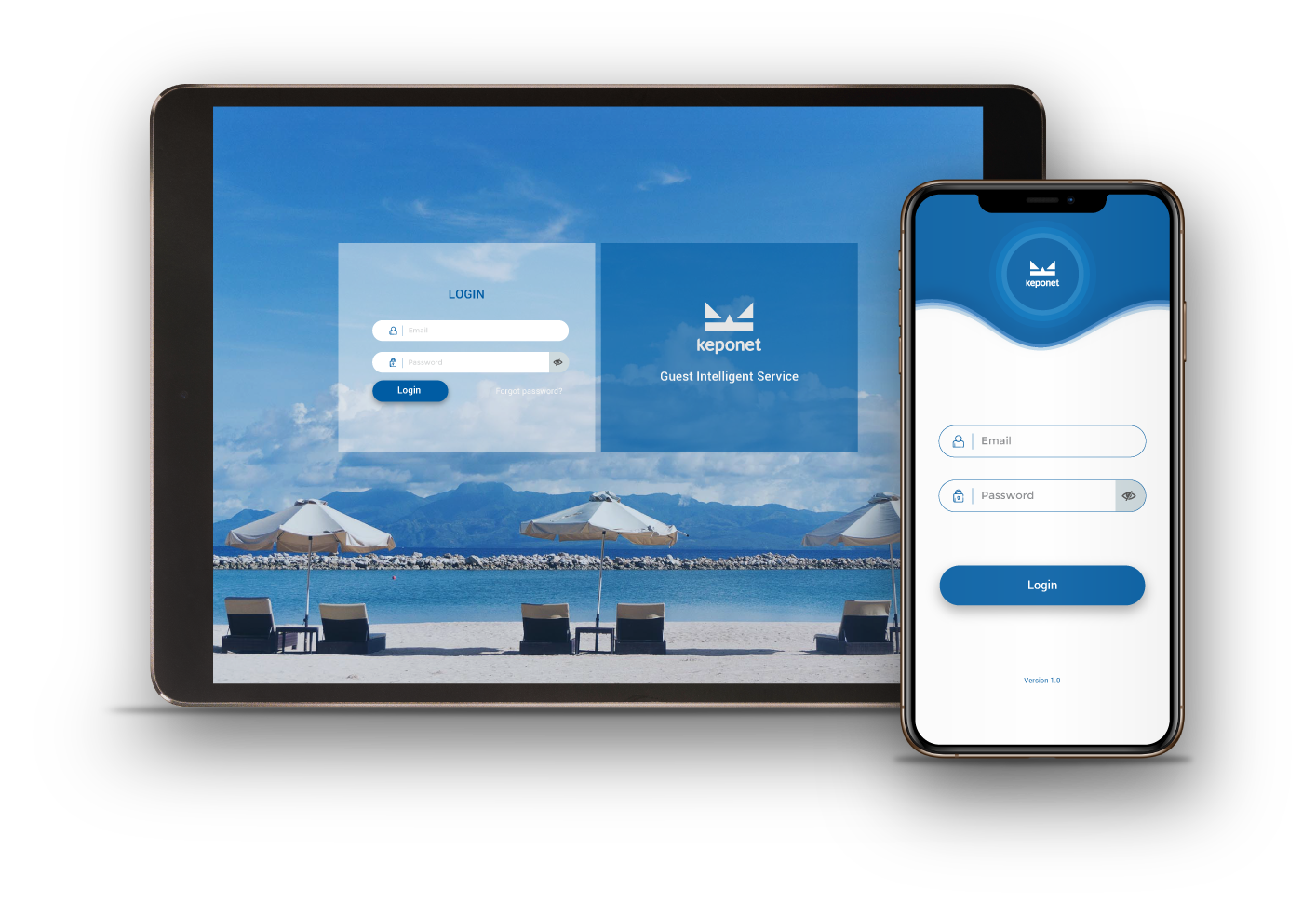



KEPONET is web-based application platform and can be installed on your gadget by downloading the application on iOS and Android.
Download free now!
 |
 |
For more details, please visit our website.
 |
Copyright © 2019 KEPONET. All Rights reserved. |
