Difference between revisions of "Operation"
m |
m |
||
| Line 54: | Line 54: | ||
</div> | </div> | ||
| − | |||
| − | |||
| − | |||
| + | <p align=center><br> Guests can order hotel services through the hotel staff they meet or via a telephone call to the receptionists. </p> | ||
| − | <div class="plainlinks" style="border: 1px solid GoldWikibuku; -moz-box-shadow: 0 1px 3px rgba(0, 0, 0, 0.35); -webkit-box-shadow: 0 1px 3px rgba(0, 0, 0, 0.35); box-shadow: 0 1px 3px rgba(0, 0, 0, 0.35); -moz-border-radius: 7px; -webkit-border-radius: 7px; border-radius: 7px; background: #fff; background: -moz-linear-gradient(top, #fff 75%, #F5F5F5 100%); background-color: #faf9b2; background-image: -moz-linear-gradient(top, #faf9b2, Khaki); background-image: -ms-linear-gradient(top, #faf9b2, Khaki); background-image: -o-linear-gradient(top, #faf9b2, Khaki); background-image: -webkit-gradient(linear, left top, left bottom, from(#faf9b2), to(Khaki)); height:auto; padding-left: 7px; padding-top:5px; padding-bottom:5px; margin-left: | + | |
| + | |||
| + | <div class="plainlinks" style="border: 1px solid GoldWikibuku; -moz-box-shadow: 0 1px 3px rgba(0, 0, 0, 0.35); -webkit-box-shadow: 0 1px 3px rgba(0, 0, 0, 0.35); box-shadow: 0 1px 3px rgba(0, 0, 0, 0.35); -moz-border-radius: 7px; -webkit-border-radius: 7px; border-radius: 7px; background: #fff; background: -moz-linear-gradient(top, #fff 75%, #F5F5F5 100%); background-color: #faf9b2; background-image: -moz-linear-gradient(top, #faf9b2, Khaki); background-image: -ms-linear-gradient(top, #faf9b2, Khaki); background-image: -o-linear-gradient(top, #faf9b2, Khaki); background-image: -webkit-gradient(linear, left top, left bottom, from(#faf9b2), to(Khaki)); height:auto; padding-left: 7px; padding-top:5px; padding-bottom:5px; margin-left:200px; margin-right:200px; margin-bottom:30px; margin-top:30px;"> | ||
<table width=100% border="0"> | <table width=100% border="0"> | ||
<tr> | <tr> | ||
| Line 69: | Line 69: | ||
</div> | </div> | ||
[[Image:arrow_down.png|100px|link=|center]] | [[Image:arrow_down.png|100px|link=|center]] | ||
| − | <div class="plainlinks" style="border: 1px solid GoldWikibuku; -moz-box-shadow: 0 1px 3px rgba(0, 0, 0, 0.35); -webkit-box-shadow: 0 1px 3px rgba(0, 0, 0, 0.35); box-shadow: 0 1px 3px rgba(0, 0, 0, 0.35); -moz-border-radius: 7px; -webkit-border-radius: 7px; border-radius: 7px; background: #fff; background: -moz-linear-gradient(top, #fff 75%, #F5F5F5 100%); background-color: #faf9b2; background-image: -moz-linear-gradient(top, #faf9b2, Khaki); background-image: -ms-linear-gradient(top, #faf9b2, Khaki); background-image: -o-linear-gradient(top, #faf9b2, Khaki); background-image: -webkit-gradient(linear, left top, left bottom, from(#faf9b2), to(Khaki)); height:auto; padding-left: 7px; padding-top:5px; padding-bottom:5px; margin-left: | + | <div class="plainlinks" style="border: 1px solid GoldWikibuku; -moz-box-shadow: 0 1px 3px rgba(0, 0, 0, 0.35); -webkit-box-shadow: 0 1px 3px rgba(0, 0, 0, 0.35); box-shadow: 0 1px 3px rgba(0, 0, 0, 0.35); -moz-border-radius: 7px; -webkit-border-radius: 7px; border-radius: 7px; background: #fff; background: -moz-linear-gradient(top, #fff 75%, #F5F5F5 100%); background-color: #faf9b2; background-image: -moz-linear-gradient(top, #faf9b2, Khaki); background-image: -ms-linear-gradient(top, #faf9b2, Khaki); background-image: -o-linear-gradient(top, #faf9b2, Khaki); background-image: -webkit-gradient(linear, left top, left bottom, from(#faf9b2), to(Khaki)); height:auto; padding-left: 7px; padding-top:5px; padding-bottom:5px; margin-left:200px; margin-right:200px; margin-bottom:30px; margin-top:30px;"> |
<table width=100% border="0"> | <table width=100% border="0"> | ||
<tr> | <tr> | ||
<td><font size="2"><p align=center><strong> Hotel Staff Inputting Guest Request Data Into Keponet. </strong></p></font> | <td><font size="2"><p align=center><strong> Hotel Staff Inputting Guest Request Data Into Keponet. </strong></p></font> | ||
<p align=center><br> Staff who receiving that orders will do inputting the guest requests into the Keponet application, so that request can be forwarded to the relevant staff. </p> | <p align=center><br> Staff who receiving that orders will do inputting the guest requests into the Keponet application, so that request can be forwarded to the relevant staff. </p> | ||
| + | |||
| + | <p align=center><br> If hotel staff feels difficult to create requests, please access the tutorial page that we have provided. Or hotel staff can also click [[Tutorial|here]]. </p> | ||
</td> | </td> | ||
</tr> | </tr> | ||
| Line 79: | Line 81: | ||
</div> | </div> | ||
[[Image:arrow_down.png|100px|link=|center]] | [[Image:arrow_down.png|100px|link=|center]] | ||
| − | <div class="plainlinks" style="border: 1px solid GoldWikibuku; -moz-box-shadow: 0 1px 3px rgba(0, 0, 0, 0.35); -webkit-box-shadow: 0 1px 3px rgba(0, 0, 0, 0.35); box-shadow: 0 1px 3px rgba(0, 0, 0, 0.35); -moz-border-radius: 7px; -webkit-border-radius: 7px; border-radius: 7px; background: #fff; background: -moz-linear-gradient(top, #fff 75%, #F5F5F5 100%); background-color: #faf9b2; background-image: -moz-linear-gradient(top, #faf9b2, Khaki); background-image: -ms-linear-gradient(top, #faf9b2, Khaki); background-image: -o-linear-gradient(top, #faf9b2, Khaki); background-image: -webkit-gradient(linear, left top, left bottom, from(#faf9b2), to(Khaki)); height:auto; padding-left: 7px; padding-top:5px; padding-bottom:5px; margin-left: | + | <div class="plainlinks" style="border: 1px solid GoldWikibuku; -moz-box-shadow: 0 1px 3px rgba(0, 0, 0, 0.35); -webkit-box-shadow: 0 1px 3px rgba(0, 0, 0, 0.35); box-shadow: 0 1px 3px rgba(0, 0, 0, 0.35); -moz-border-radius: 7px; -webkit-border-radius: 7px; border-radius: 7px; background: #fff; background: -moz-linear-gradient(top, #fff 75%, #F5F5F5 100%); background-color: #faf9b2; background-image: -moz-linear-gradient(top, #faf9b2, Khaki); background-image: -ms-linear-gradient(top, #faf9b2, Khaki); background-image: -o-linear-gradient(top, #faf9b2, Khaki); background-image: -webkit-gradient(linear, left top, left bottom, from(#faf9b2), to(Khaki)); height:auto; padding-left: 7px; padding-top:5px; padding-bottom:5px; margin-left:200px; margin-right:200px; margin-bottom:30px; margin-top:30px;"> |
<table width=100% border="0"> | <table width=100% border="0"> | ||
<tr> | <tr> | ||
| − | <td><font size="2"><p align=center><strong> The | + | <td><font size="2"><p align=center><strong> The Keponet Will Send Requests Automatically To Related Staff According The "Delegate To" Data. </strong></p></font> |
<p align=center><br> All orders will be saved to Keponet Data Bank and then forwarded it to the appropriate staff and departments. </p> | <p align=center><br> All orders will be saved to Keponet Data Bank and then forwarded it to the appropriate staff and departments. </p> | ||
</td> | </td> | ||
| Line 89: | Line 91: | ||
</div> | </div> | ||
[[Image:arrow_down.png|100px|link=|center]] | [[Image:arrow_down.png|100px|link=|center]] | ||
| − | <div class="plainlinks" style="border: 1px solid GoldWikibuku; -moz-box-shadow: 0 1px 3px rgba(0, 0, 0, 0.35); -webkit-box-shadow: 0 1px 3px rgba(0, 0, 0, 0.35); box-shadow: 0 1px 3px rgba(0, 0, 0, 0.35); -moz-border-radius: 7px; -webkit-border-radius: 7px; border-radius: 7px; background: #fff; background: -moz-linear-gradient(top, #fff 75%, #F5F5F5 100%); background-color: #faf9b2; background-image: -moz-linear-gradient(top, #faf9b2, Khaki); background-image: -ms-linear-gradient(top, #faf9b2, Khaki); background-image: -o-linear-gradient(top, #faf9b2, Khaki); background-image: -webkit-gradient(linear, left top, left bottom, from(#faf9b2), to(Khaki)); height:auto; padding-left: 7px; padding-top:5px; padding-bottom:5px; margin-left: | + | <div class="plainlinks" style="border: 1px solid GoldWikibuku; -moz-box-shadow: 0 1px 3px rgba(0, 0, 0, 0.35); -webkit-box-shadow: 0 1px 3px rgba(0, 0, 0, 0.35); box-shadow: 0 1px 3px rgba(0, 0, 0, 0.35); -moz-border-radius: 7px; -webkit-border-radius: 7px; border-radius: 7px; background: #fff; background: -moz-linear-gradient(top, #fff 75%, #F5F5F5 100%); background-color: #faf9b2; background-image: -moz-linear-gradient(top, #faf9b2, Khaki); background-image: -ms-linear-gradient(top, #faf9b2, Khaki); background-image: -o-linear-gradient(top, #faf9b2, Khaki); background-image: -webkit-gradient(linear, left top, left bottom, from(#faf9b2), to(Khaki)); height:auto; padding-left: 7px; padding-top:5px; padding-bottom:5px; margin-left:200px; margin-right:200px; margin-bottom:30px; margin-top:30px;"> |
<table width=100% border="0"> | <table width=100% border="0"> | ||
<tr> | <tr> | ||
| Line 99: | Line 101: | ||
</div> | </div> | ||
[[Image:arrow_down.png|100px|link=|center]] | [[Image:arrow_down.png|100px|link=|center]] | ||
| − | <div class="plainlinks" style="border: 1px solid GoldWikibuku; -moz-box-shadow: 0 1px 3px rgba(0, 0, 0, 0.35); -webkit-box-shadow: 0 1px 3px rgba(0, 0, 0, 0.35); box-shadow: 0 1px 3px rgba(0, 0, 0, 0.35); -moz-border-radius: 7px; -webkit-border-radius: 7px; border-radius: 7px; background: #fff; background: -moz-linear-gradient(top, #fff 75%, #F5F5F5 100%); background-color: #faf9b2; background-image: -moz-linear-gradient(top, #faf9b2, Khaki); background-image: -ms-linear-gradient(top, #faf9b2, Khaki); background-image: -o-linear-gradient(top, #faf9b2, Khaki); background-image: -webkit-gradient(linear, left top, left bottom, from(#faf9b2), to(Khaki)); height:auto; padding-left: 7px; padding-top:5px; padding-bottom:5px; margin-left: | + | <div class="plainlinks" style="border: 1px solid GoldWikibuku; -moz-box-shadow: 0 1px 3px rgba(0, 0, 0, 0.35); -webkit-box-shadow: 0 1px 3px rgba(0, 0, 0, 0.35); box-shadow: 0 1px 3px rgba(0, 0, 0, 0.35); -moz-border-radius: 7px; -webkit-border-radius: 7px; border-radius: 7px; background: #fff; background: -moz-linear-gradient(top, #fff 75%, #F5F5F5 100%); background-color: #faf9b2; background-image: -moz-linear-gradient(top, #faf9b2, Khaki); background-image: -ms-linear-gradient(top, #faf9b2, Khaki); background-image: -o-linear-gradient(top, #faf9b2, Khaki); background-image: -webkit-gradient(linear, left top, left bottom, from(#faf9b2), to(Khaki)); height:auto; padding-left: 7px; padding-top:5px; padding-bottom:5px; margin-left:200px; margin-right:200px; margin-bottom:30px; margin-top:30px;"> |
| + | <table width=100% border="0"> | ||
| + | <tr> | ||
| + | <td><font size="2"><p align=center><strong> Hotel Staff Processes Guest Requests. </strong></p></font> | ||
| + | <p align=center><br> Hotel staff strives to complete hotel guest requests quickly while still keeping the best quality of items requested. </p> | ||
| + | </td> | ||
| + | </tr> | ||
| + | </table> | ||
| + | </div> | ||
| + | [[Image:arrow_down.png|100px|link=|center]] | ||
| + | <div class="plainlinks" style="border: 1px solid GoldWikibuku; -moz-box-shadow: 0 1px 3px rgba(0, 0, 0, 0.35); -webkit-box-shadow: 0 1px 3px rgba(0, 0, 0, 0.35); box-shadow: 0 1px 3px rgba(0, 0, 0, 0.35); -moz-border-radius: 7px; -webkit-border-radius: 7px; border-radius: 7px; background: #fff; background: -moz-linear-gradient(top, #fff 75%, #F5F5F5 100%); background-color: #faf9b2; background-image: -moz-linear-gradient(top, #faf9b2, Khaki); background-image: -ms-linear-gradient(top, #faf9b2, Khaki); background-image: -o-linear-gradient(top, #faf9b2, Khaki); background-image: -webkit-gradient(linear, left top, left bottom, from(#faf9b2), to(Khaki)); height:auto; padding-left: 7px; padding-top:5px; padding-bottom:5px; margin-left:200px; margin-right:200px; margin-bottom:30px; margin-top:30px;"> | ||
<table width=100% border="0"> | <table width=100% border="0"> | ||
<tr> | <tr> | ||
| − | <td><font size="2"><p align=center><strong> The | + | <td><font size="2"><p align=center><strong> Delivered To Guests With The Best Standards. </strong></p></font> |
| − | <p align=center><br> | + | <p align=center><br> All orders will be processed and sent to hotel guests quickly, effective and precisely as expected by hotel guests. </p> |
| + | </td> | ||
| + | </tr> | ||
| + | </table> | ||
| + | </div> | ||
| + | [[Image:arrow_down.png|100px|link=|center]] | ||
| + | <div class="plainlinks" style="border: 1px solid GoldWikibuku; -moz-box-shadow: 0 1px 3px rgba(0, 0, 0, 0.35); -webkit-box-shadow: 0 1px 3px rgba(0, 0, 0, 0.35); box-shadow: 0 1px 3px rgba(0, 0, 0, 0.35); -moz-border-radius: 7px; -webkit-border-radius: 7px; border-radius: 7px; background: #fff; background: -moz-linear-gradient(top, #fff 75%, #F5F5F5 100%); background-color: #faf9b2; background-image: -moz-linear-gradient(top, #faf9b2, Khaki); background-image: -ms-linear-gradient(top, #faf9b2, Khaki); background-image: -o-linear-gradient(top, #faf9b2, Khaki); background-image: -webkit-gradient(linear, left top, left bottom, from(#faf9b2), to(Khaki)); height:auto; padding-left: 7px; padding-top:5px; padding-bottom:5px; margin-left:200px; margin-right:200px; margin-bottom:30px; margin-top:30px;"> | ||
| + | <table width=100% border="0"> | ||
| + | <tr> | ||
| + | <td><font size="2"><p align=center><strong> Hotel Guests Will Be Happy With The Hotel Services. </strong></p></font> | ||
| + | <p align=center><br> All orders will quickly arrive at hotel guests. The maximum service that your hotel provides can increase the satisfaction of your hotel guests. </p> | ||
| + | </td> | ||
| + | </tr> | ||
| + | </table> | ||
| + | </div> | ||
| + | [[Image:arrow_down.png|100px|link=|center]] | ||
| + | <div class="plainlinks" style="border: 1px solid GoldWikibuku; -moz-box-shadow: 0 1px 3px rgba(0, 0, 0, 0.35); -webkit-box-shadow: 0 1px 3px rgba(0, 0, 0, 0.35); box-shadow: 0 1px 3px rgba(0, 0, 0, 0.35); -moz-border-radius: 7px; -webkit-border-radius: 7px; border-radius: 7px; background: #fff; background: -moz-linear-gradient(top, #fff 75%, #F5F5F5 100%); background-color: #faf9b2; background-image: -moz-linear-gradient(top, #faf9b2, Khaki); background-image: -ms-linear-gradient(top, #faf9b2, Khaki); background-image: -o-linear-gradient(top, #faf9b2, Khaki); background-image: -webkit-gradient(linear, left top, left bottom, from(#faf9b2), to(Khaki)); height:auto; padding-left: 7px; padding-top:5px; padding-bottom:5px; margin-left:200px; margin-right:200px; margin-bottom:30px; margin-top:30px;"> | ||
| + | <table width=100% border="0"> | ||
| + | <tr> | ||
| + | <td><font size="2"><p align=center><strong> Hotel Staff Must Change The Their Task Status To "Finish". </strong></p></font> | ||
| + | <p align=center><br> Hotel staff must change their task status to "Finished" after completing the request from hotel guest. It's meant to stop the running time in Keponet system, so that their data records will be recorded in accordance with the actual conditions. </p> | ||
| + | <p align=center><br> If hotel staff feels difficult to create requests, please access the tutorial page that we have provided. Or hotel staff can also click [[Tutorial|here]].</p> | ||
| + | </td> | ||
| + | </tr> | ||
| + | </table> | ||
| + | </div> | ||
| + | [[Image:arrow_down.png|100px|link=|center]] | ||
| + | <div class="plainlinks" style="border: 1px solid GoldWikibuku; -moz-box-shadow: 0 1px 3px rgba(0, 0, 0, 0.35); -webkit-box-shadow: 0 1px 3px rgba(0, 0, 0, 0.35); box-shadow: 0 1px 3px rgba(0, 0, 0, 0.35); -moz-border-radius: 7px; -webkit-border-radius: 7px; border-radius: 7px; background: #fff; background: -moz-linear-gradient(top, #fff 75%, #F5F5F5 100%); background-color: #faf9b2; background-image: -moz-linear-gradient(top, #faf9b2, Khaki); background-image: -ms-linear-gradient(top, #faf9b2, Khaki); background-image: -o-linear-gradient(top, #faf9b2, Khaki); background-image: -webkit-gradient(linear, left top, left bottom, from(#faf9b2), to(Khaki)); height:auto; padding-left: 7px; padding-top:5px; padding-bottom:5px; margin-left:200px; margin-right:200px; margin-bottom:30px; margin-top:30px;"> | ||
| + | <table width=100% border="0"> | ||
| + | <tr> | ||
| + | <td><font size="2"><p align=center><strong> Report in Realtime. </strong></p></font> | ||
| + | <p align=center><br> All orders that occur at the hotel will be stored into Data Bank of Keponet, so all activity processes will be recorded properly from the beginning to the end. The Keponet will also provide reports needed by hotel management instantly and in real time. | ||
| + | </p> | ||
</td> | </td> | ||
</tr> | </tr> | ||
</table> | </table> | ||
</div> | </div> | ||
| − | |||
| − | |||
Revision as of 14:47, 25 October 2019
|
Hello !!!
|
|
| You can find all the information you need about Keponet.
|
|

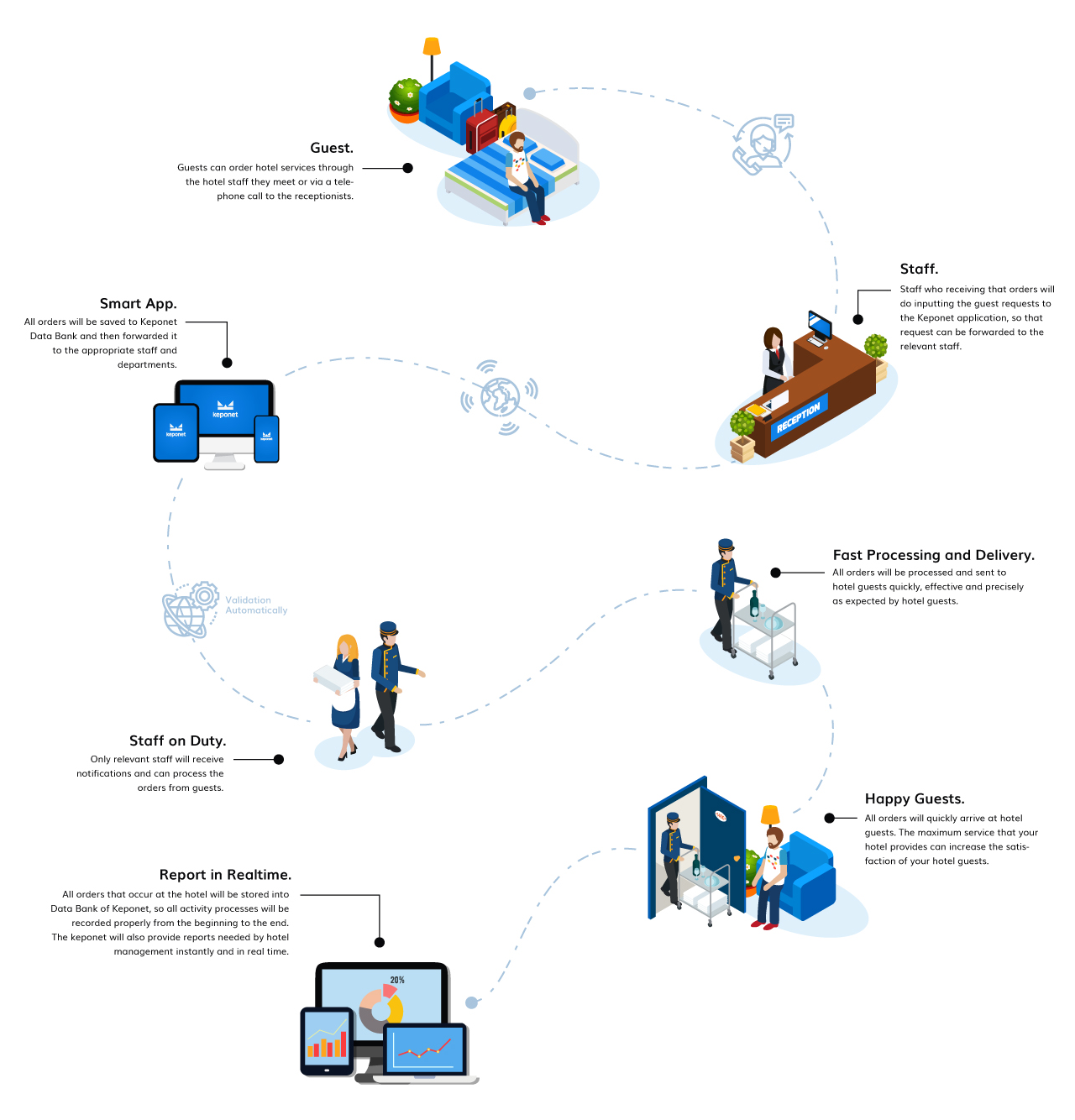
Keponet is a system that really helps the work of hotel staff when there are guests who make a request to the hotel. Usually, hotel guests will contact the front office staff to place an order. However, with the Keponet application; staff on duty in the field will be able to send orders directly to the relevant department. Then, how does it work?
Scenario |
Guests can order hotel services through the hotel staff they meet or via a telephone call to the receptionists.
The Hotel Guests Make Requests.
|

Hotel Staff Inputting Guest Request Data Into Keponet.
|
The Keponet Will Send Requests Automatically To Related Staff According The "Delegate To" Data.
|
The Relevant Staff Will Get a Notification From Keponet.
|
Hotel Staff Processes Guest Requests.
|
Delivered To Guests With The Best Standards.
|
Hotel Guests Will Be Happy With The Hotel Services.
|
Hotel Staff Must Change The Their Task Status To "Finish".
|
Report in Realtime.
|
For more details, please visit our website.
 |
Copyright © 2019 KEPONET. All Rights reserved. |
