Difference between revisions of "Operation"
m |
m |
||
| Line 46: | Line 46: | ||
| − | <div class="plainlinks" style="border: 1px solid SkyBlue; -moz-box-shadow: 0 1px 3px rgba(0, 0, 0, 0.35); -webkit-box-shadow: 0 1px 3px rgba(0, 0, 0, 0.35); box-shadow: 0 1px 3px rgba(0, 0, 0, 0.35); -moz-border-radius: 7px; -webkit-border-radius: 7px; border-radius: 7px; background: #fff; background: -moz-linear-gradient(top, #fff 75%, #F5F5F5 100%); background-color: LightBlue; background-image: -moz-linear-gradient(top, LightBlue, #5f96d3); background-image: -ms-linear-gradient(top, LightBlue, #5f96d3); background-image: -o-linear-gradient(top, LightBlue, #5f96d3); background-image: -webkit-gradient(linear, left top, left bottom, from(LightBlue), to(#5f96d3)); height:auto; padding-left: 7px; padding-top:5px; padding-bottom:0px; margin-left: | + | <div class="plainlinks" style="border: 1px solid SkyBlue; -moz-box-shadow: 0 1px 3px rgba(0, 0, 0, 0.35); -webkit-box-shadow: 0 1px 3px rgba(0, 0, 0, 0.35); box-shadow: 0 1px 3px rgba(0, 0, 0, 0.35); -moz-border-radius: 7px; -webkit-border-radius: 7px; border-radius: 7px; background: #fff; background: -moz-linear-gradient(top, #fff 75%, #F5F5F5 100%); background-color: LightBlue; background-image: -moz-linear-gradient(top, LightBlue, #5f96d3); background-image: -ms-linear-gradient(top, LightBlue, #5f96d3); background-image: -o-linear-gradient(top, LightBlue, #5f96d3); background-image: -webkit-gradient(linear, left top, left bottom, from(LightBlue), to(#5f96d3)); height:auto; padding-left: 7px; padding-top:5px; padding-bottom:0px; margin-left:75px; margin-right:75px;"> |
<table width=98% border="0"> | <table width=98% border="0"> | ||
<tr> | <tr> | ||
Revision as of 15:05, 25 October 2019
|
Hello !!!
|
|
| You can find all the information you need about Keponet.
|
|

Keponet is a system that really helps the work of hotel staff when there are guests who make a request to the hotel. Usually, hotel guests will contact the front office staff to place an order. However, with the Keponet application; staff on duty in the field will be able to send orders directly to the relevant department. Then, how does it work?
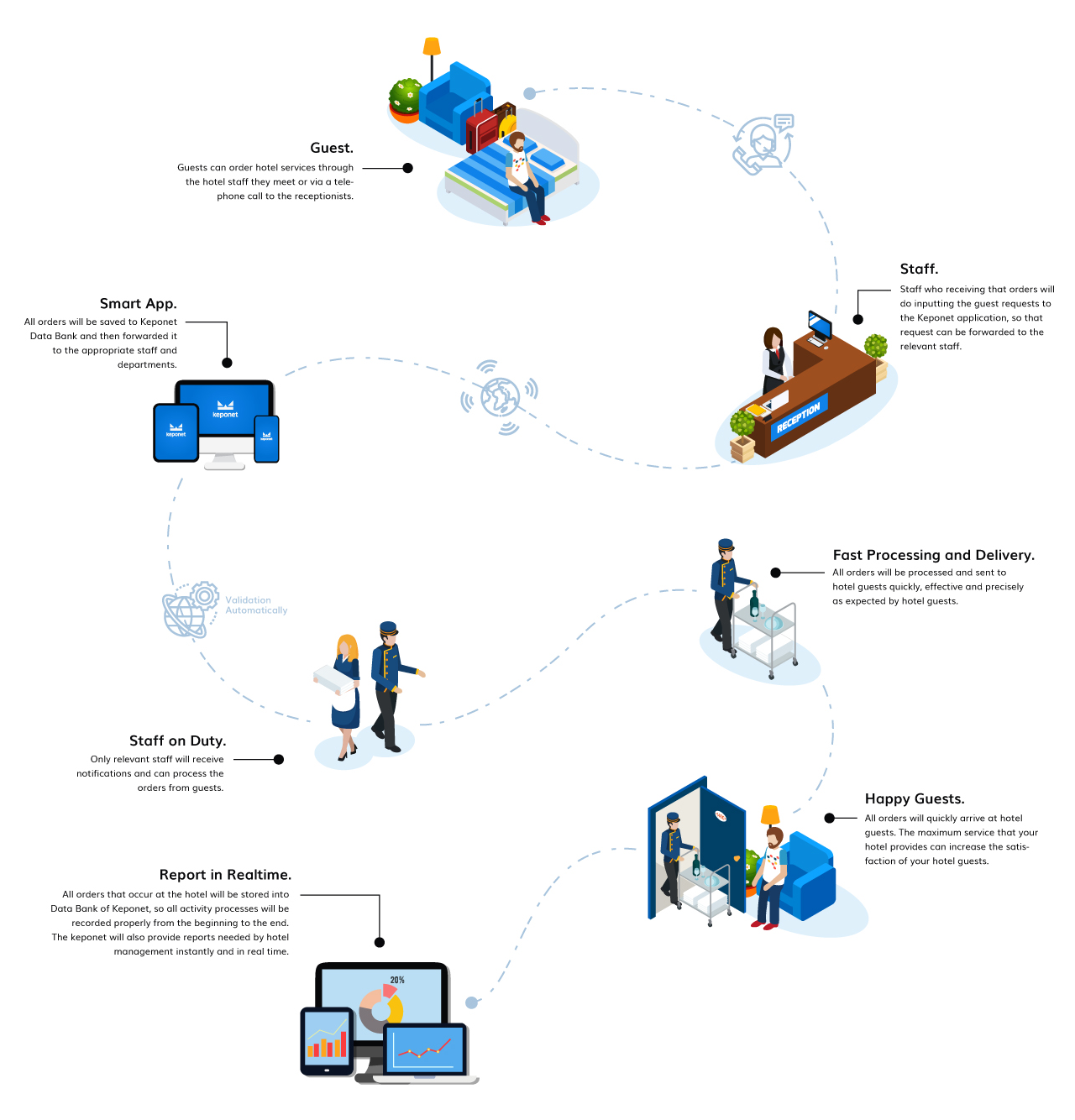
Description |
This is an example of the request flow when your hotel already uses the Keponet system
The Hotel Guests Make Requests.
|

Hotel Staff Inputting Guest Request Data Into Keponet.
|
The Keponet Will Send Requests Automatically To Related Staff According The "Delegate To" Data.
|
The Relevant Staff Will Get a Notification From Keponet.
|
Hotel Staff Processes Guest Requests.
|
Delivered To Guests With The Best Standards.
|
Hotel Guests Will Be Happy With The Hotel Services.
|
Hotel Staff Must Change The Their Task Status To "Finish".
|
Report in Realtime.
|
For more details, please visit our website.
 |
Copyright © 2019 KEPONET. All Rights reserved. |
