Difference between revisions of "Operation"
m (line) |
m |
||
| Line 46: | Line 46: | ||
| − | <div class="plainlinks" style="border: 1px solid SkyBlue; -moz-box-shadow: 0 1px 3px rgba(0, 0, 0, 0.35); -webkit-box-shadow: 0 1px 3px rgba(0, 0, 0, 0.35); box-shadow: 0 1px 3px rgba(0, 0, 0, 0.35); -moz-border-radius: 7px; -webkit-border-radius: 7px; border-radius: 7px; background: #fff; background: -moz-linear-gradient(top, #fff 75%, #F5F5F5 100%); background-color: LightBlue; background-image: -moz-linear-gradient(top, LightBlue, #5f96d3); background-image: -ms-linear-gradient(top, LightBlue, #5f96d3); background-image: -o-linear-gradient(top, LightBlue, #5f96d3); background-image: -webkit-gradient(linear, left top, left bottom, from(LightBlue), to(#5f96d3)); height:auto; padding-left: 7px; padding-top:5px; padding-bottom: | + | |
| − | <table width=98% border=" | + | |
| + | <div class="plainlinks" style="border: 1px solid SkyBlue; -moz-box-shadow: 0 1px 3px rgba(0, 0, 0, 0.35); -webkit-box-shadow: 0 1px 3px rgba(0, 0, 0, 0.35); box-shadow: 0 1px 3px rgba(0, 0, 0, 0.35); -moz-border-radius: 7px; -webkit-border-radius: 7px; border-radius: 7px; background: #fff; background: -moz-linear-gradient(top, #fff 75%, #F5F5F5 100%); background-color: LightBlue; background-image: -moz-linear-gradient(top, LightBlue, #5f96d3); background-image: -ms-linear-gradient(top, LightBlue, #5f96d3); background-image: -o-linear-gradient(top, LightBlue, #5f96d3); background-image: -webkit-gradient(linear, left top, left bottom, from(LightBlue), to(#5f96d3)); height:auto; padding-left: 7px; padding-top:5px; padding-bottom:5px; margin-left:75px; margin-right:75px;"> | ||
| + | <table width=98% border="1"> | ||
<tr> | <tr> | ||
| − | <td><p align=center><strong> | + | <td><h4><p align=center><u><strong>DESCRIPTION</strong></u></h4></p> |
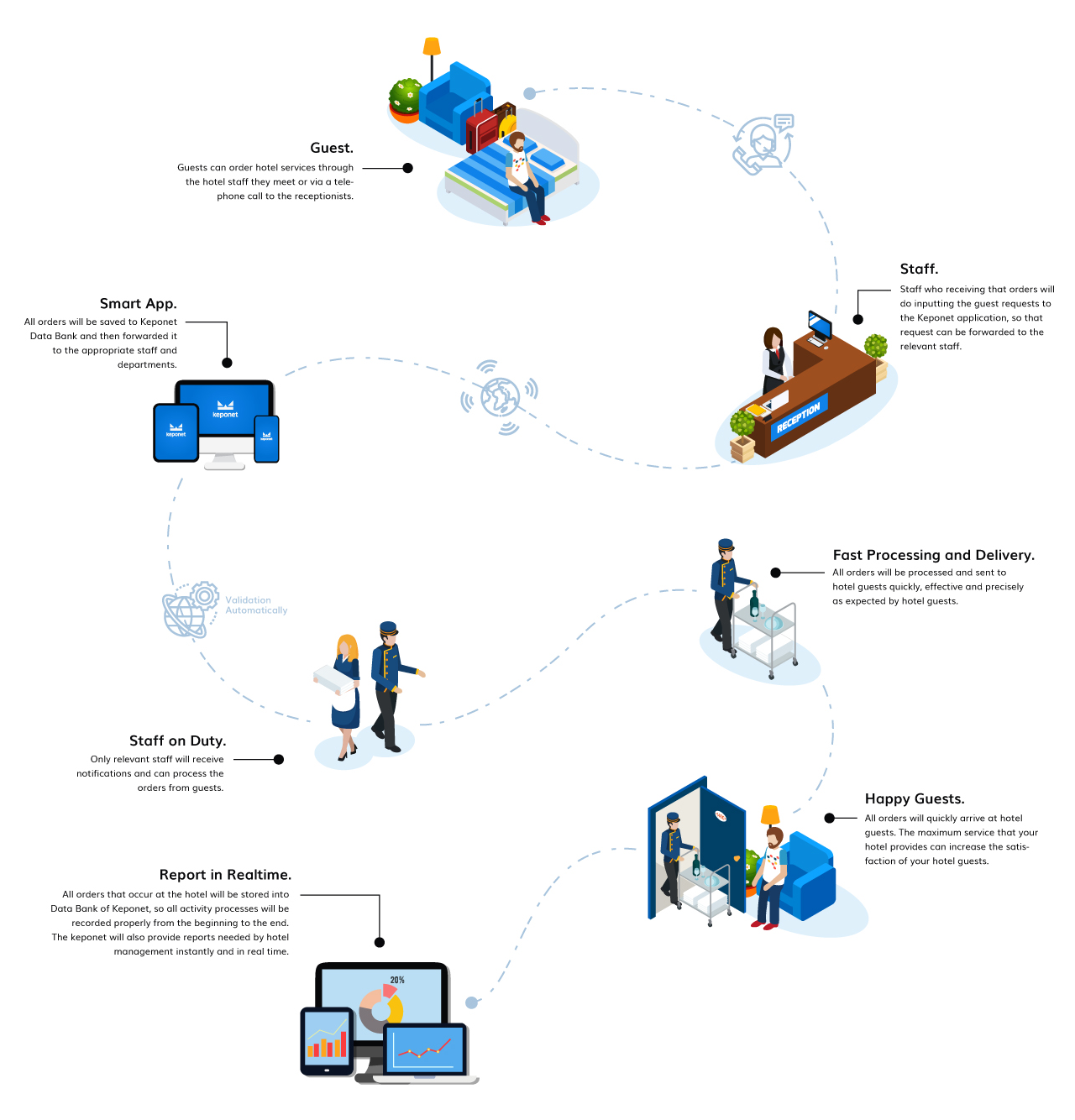
| + | <p align=center> This is an example of the request flow when your hotel already uses the Keponet system </p> | ||
| + | </td> | ||
</tr> | </tr> | ||
</table> | </table> | ||
</div> | </div> | ||
| − | + | ||
| Line 151: | Line 155: | ||
</table> | </table> | ||
</div> | </div> | ||
| + | |||
| + | |||
| + | |||
| + | <div style="border:0; -moz-box-shadow: 0 1px 3px rgba(0, 0, 0, 0.35); -webkit-box-shadow: 0 1px 3px rgba(0, 0, 0, 0.35); box-shadow: 0 1px 3px rgba(0, 0, 0, 0.35); -moz-border-radius: 7px; -webkit-border-radius: 7px 7px 7px 7px; border-radius: 7px; background: #fff; background: -moz-linear-gradient(top, #fff 75%, #F5F5F5 100%); background: -webkit-gradient(linear, left top, left bottom, color-stop(75%,#fff), color-stop(100%,#F5F5F5)); background: -webkit-linear-gradient(top, #fff 75%,#F5F5F5 100%); background: -o-linear-gradient(top, #fff 75%,#F5F5F5 100%); background: -ms-linear-gradient(top, #fff 75%,#F5F5F5 100%); background: linear-gradient(top, #fff 75%,#fff 100%); height:auto; padding-left:20px; padding-top:3px; padding-bottom:10px; padding-right:20px; margin-left:10px; margin-right:0px; margin-top:7px; margin-bottom:10px;"> | ||
| + | <table align="center" border="0"> | ||
| + | <tr> | ||
| + | <td> | ||
| + | <p align=center><br><strong> As an attention! </strong></p> | ||
| + | <p align=center><br> The keponet is a system that we designed to select data from a list that was previously entered, not from entering new data when operational activities are running. It aims to minimize duplicated data. Therefore, setting up data is very necessary before operational activities run in your hotel. | ||
| + | <p align=center><br> To see the default data sample when you do setting data, please click [https://drive.google.com/open?id=1S6JsxJGTU1C31ensO3wYkO6UL76MPWmz here]. </p> | ||
| + | </td> | ||
| + | </tr> | ||
| + | </table> | ||
| + | </div> | ||
| + | |||
Revision as of 14:52, 12 November 2019
|
Hello !!!
|
|
| You can find all the information you need about Keponet.
|
|

Keponet is a system that really helps the work of hotel staff when there are guests who make a request to the hotel. Usually, hotel guests will contact the front office staff to place an order. However, with the Keponet application; staff on duty in the field will be able to send orders directly to the relevant department. Then, how does it work?
|
The Hotel Guests Make Requests.
|

Hotel Staff Inputting Guest Request Data Into Keponet.
|
The Keponet Will Send Requests Automatically To Related Staff According The "Delegate To" Data.
|
The Relevant Staff Will Get a Notification From Keponet.
|
Hotel Staff Processes Guest Requests.
|
Delivered To Guests With The Best Standards.
|
Hotel Guests Will Be Happy With The Hotel Services.
|
Hotel Staff Must Change The Their Task Status To "Finish".
|
Report in Realtime.
|
|
|
For more details, please visit our website.
 |
Copyright © 2019 KEPONET. All Rights reserved. |
