Difference between revisions of "Operation"
m |
m |
||
| Line 42: | Line 42: | ||
</p> | </p> | ||
| − | [[Image:KnowledgeBase1.png| | + | [[Image:KnowledgeBase1.png|875px|link=|center|Knowledge Base]] |
| Line 53: | Line 53: | ||
</table> | </table> | ||
</div> | </div> | ||
| + | <h3><p align=center><br> This is an example of the request flow when your hotel already uses the Keponet system </p></h3> | ||
| − | |||
<div class="plainlinks" style="border: 1px solid GoldWikibuku; -moz-box-shadow: 0 1px 3px rgba(0, 0, 0, 0.35); -webkit-box-shadow: 0 1px 3px rgba(0, 0, 0, 0.35); box-shadow: 0 1px 3px rgba(0, 0, 0, 0.35); -moz-border-radius: 7px; -webkit-border-radius: 7px; border-radius: 7px; background: #fff; background: -moz-linear-gradient(top, #fff 75%, #F5F5F5 100%); background-color: #faf9b2; background-image: -moz-linear-gradient(top, #faf9b2, Khaki); background-image: -ms-linear-gradient(top, #faf9b2, Khaki); background-image: -o-linear-gradient(top, #faf9b2, Khaki); background-image: -webkit-gradient(linear, left top, left bottom, from(#faf9b2), to(Khaki)); height:auto; padding-left: 7px; padding-top:5px; padding-bottom:5px; margin-left:200px; margin-right:200px; margin-bottom:30px; margin-top:30px;"> | <div class="plainlinks" style="border: 1px solid GoldWikibuku; -moz-box-shadow: 0 1px 3px rgba(0, 0, 0, 0.35); -webkit-box-shadow: 0 1px 3px rgba(0, 0, 0, 0.35); box-shadow: 0 1px 3px rgba(0, 0, 0, 0.35); -moz-border-radius: 7px; -webkit-border-radius: 7px; border-radius: 7px; background: #fff; background: -moz-linear-gradient(top, #fff 75%, #F5F5F5 100%); background-color: #faf9b2; background-image: -moz-linear-gradient(top, #faf9b2, Khaki); background-image: -ms-linear-gradient(top, #faf9b2, Khaki); background-image: -o-linear-gradient(top, #faf9b2, Khaki); background-image: -webkit-gradient(linear, left top, left bottom, from(#faf9b2), to(Khaki)); height:auto; padding-left: 7px; padding-top:5px; padding-bottom:5px; margin-left:200px; margin-right:200px; margin-bottom:30px; margin-top:30px;"> | ||
Revision as of 15:18, 25 October 2019
|
Hello !!!
|
|
| You can find all the information you need about Keponet.
|
|

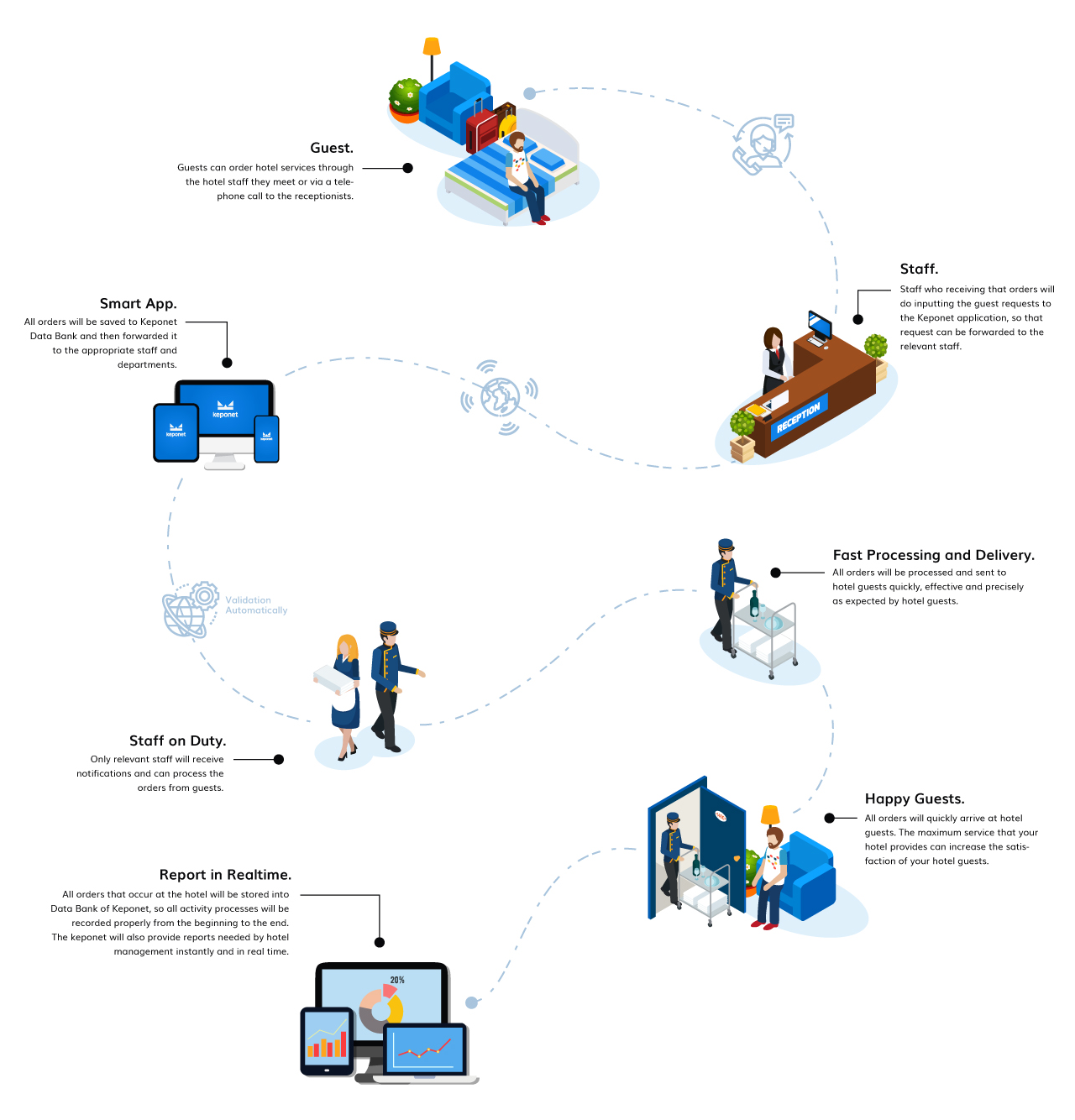
Keponet is a system that really helps the work of hotel staff when there are guests who make a request to the hotel. Usually, hotel guests will contact the front office staff to place an order. However, with the Keponet application; staff on duty in the field will be able to send orders directly to the relevant department. Then, how does it work?
Description |
This is an example of the request flow when your hotel already uses the Keponet system
This is an example of the request flow when your hotel already uses the Keponet system
The Hotel Guests Make Requests.
|

Hotel Staff Inputting Guest Request Data Into Keponet.
|
The Keponet Will Send Requests Automatically To Related Staff According The "Delegate To" Data.
|
The Relevant Staff Will Get a Notification From Keponet.
|
Hotel Staff Processes Guest Requests.
|
Delivered To Guests With The Best Standards.
|
Hotel Guests Will Be Happy With The Hotel Services.
|
Hotel Staff Must Change The Their Task Status To "Finish".
|
Report in Realtime.
|
For more details, please visit our website.
 |
Copyright © 2019 KEPONET. All Rights reserved. |
